 8 months ago
247
8 months ago
247
As agentic AI applications gain ground, the trick becomes how to build multi-agent systems quickly with all the connective tissue built in. In this fifth installment of our series, The Rise of Agentic AI, we explain how to build a simple agentic application using the OpenAI Agents SDK and instrument the data with Dynatrace.
Recently, OpenAI released a customer service agents demo built using the OpenAI Agents Python SDK that showcases an example multi-agent system at work. With the OpenAI Agents SDK, you can build agentic AI applications with the help of agents, handoffs, guardrails, tools (built-in and custom), and built-in tracing. These capabilities support the core pattern of knowledge, reasoning, and actioning as the foundation for scalable and trustworthy automation, first introduced by Dynatrace CTO Bernd Greifeneder.
In this blog post, we will explain how to build a simple customer service agentic application and instrument the data with Dynatrace. Dynatrace can help you see agent executions, tool usages, and prompt flows from initial request to final response for quick root cause analysis and troubleshooting.
To illustrate the power of the OpenAI Agents SDK and agent framework with Azure OpenAI on Azure AI Foundry, we have built on top of a solution with the Google Agent Development Kit (ADK) and A2A protocol using the demo as a reference, which you can see in this Github repo.
About our sample agentic AI application
Our demo customer service app processes customer requests and returns results optimized in various ways. It consists of four agents:
- Welcome Agent: Engages the user, reasons with Azure OpenAI to analyze the prompt, and passes it to the right agent.
- Researcher Agent: Searches the web and analyzes the results using OpenAI.
- Summarizer Agent: Summarizes the content including text, PDF, CSV, and more using Anthropic Claude.
- Translator agent: Translates the results to any language using OpenAI.
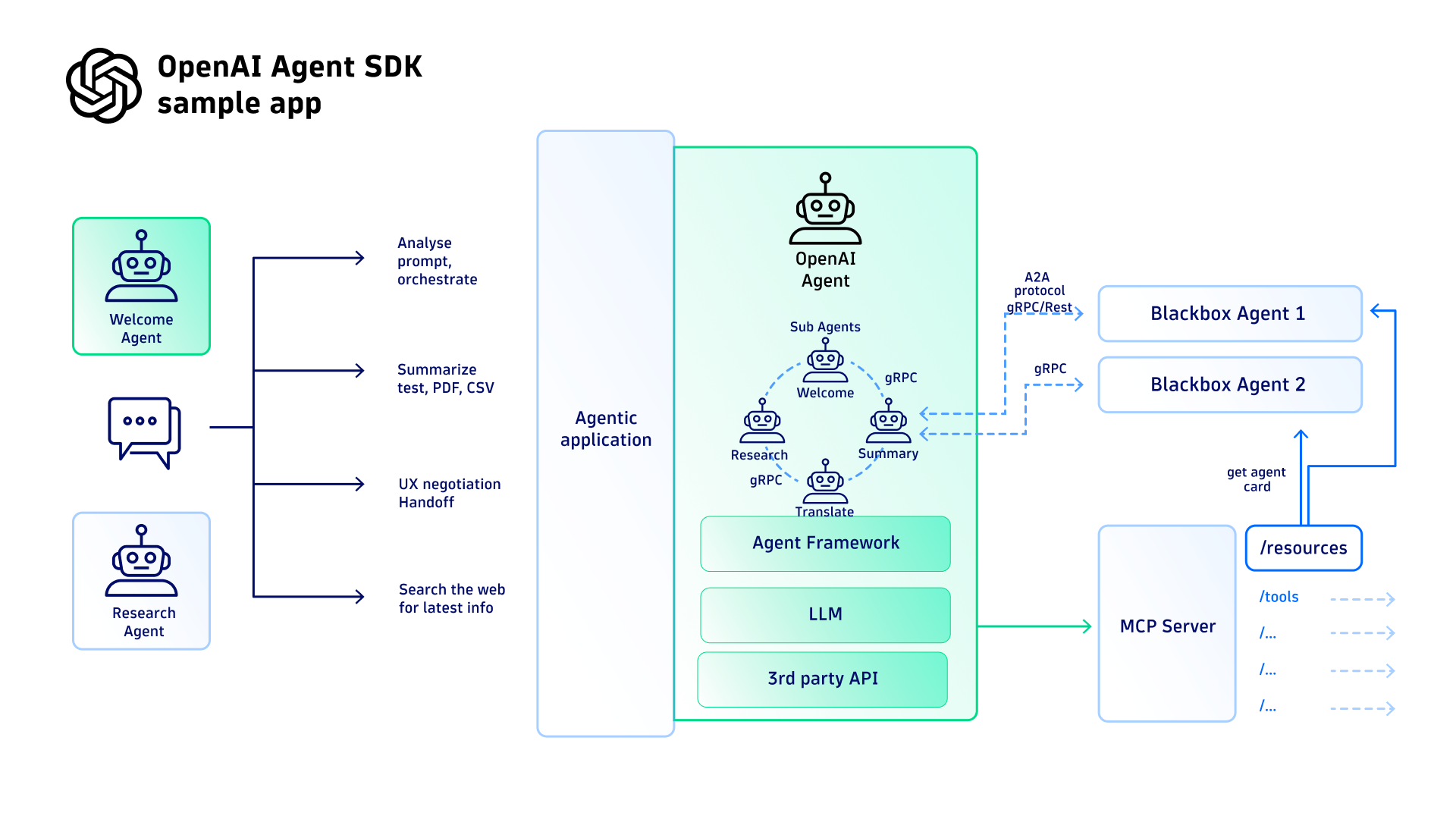 Figure 1: Azure OpenAI Agent SDK setup for demo application in Github
Next, we want the multi-agent system to perform two distinct scenarios:
- Context history: In a specified chat session, the entire chat history and context is available for the duration of the session, while the individual prompts might be handed off to different agents for processing.
- Composite queries: The app orchestrates multiple different agents for different purposes, such as Research, Translate, Summary, Welcome, so users can engage to process multiple sub-queries prompts.
Understanding multi-agent frameworks and handoff workflows
There are some key differences between the agent frameworks. Unlike the A2A protocol, the OpenAI framework does not explicitly have a central registry for agents. Instead, OpenAI agents use the concept of “handoffs” orchestrated by OpenAI Agent Framework.
OpenAI framework agent handoffs
While orchestrator-led coordination offers a more deterministic and structured workflow, agent-to-agent handoffs provide significant advantages in adaptability and modularity. These handoffs enable agents to collaborate dynamically, making it possible to handle complex, multi-step queries with greater flexibility. This approach focuses on a more decentralized and scalable system, allowing agents to specialize and respond to changing requirements in real-time.
Here are two example scenarios to illustrate the agent-to-agent collaboration in chat sessions, with context, as well as delivering multi-agent query processing.
Show the user prompts for a composite query and multi-agent workflow
For example: “Research Michael Jordan, then summarize in 40 words or less, and then translate to French.”
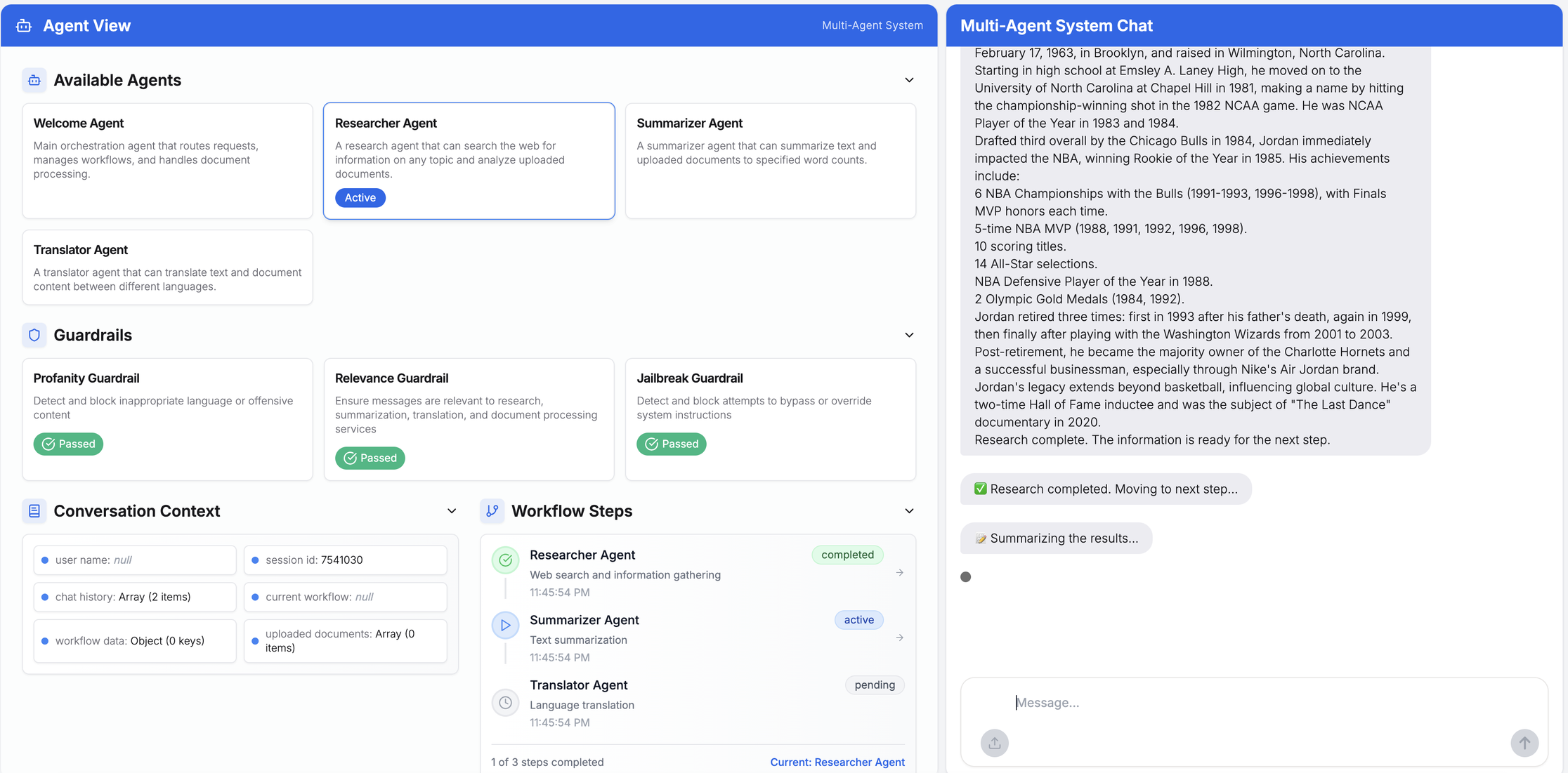 Figure 2: User prompt -> Welcome Agent -> Identifies as multi-step workflow -> Handoff -> Researcher
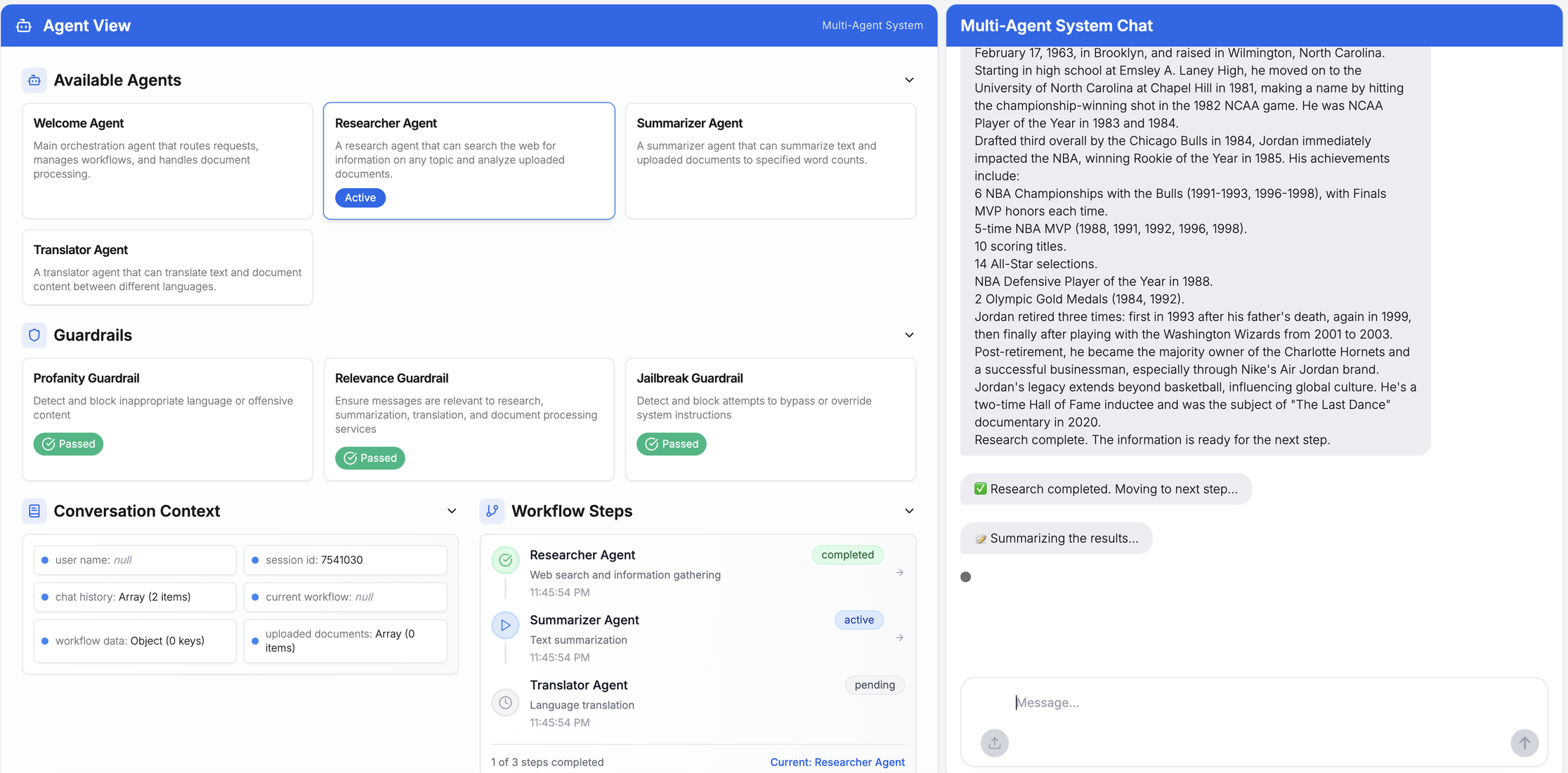 Figure 3: Researcher Agent processes -> Handoff -> Summarizer
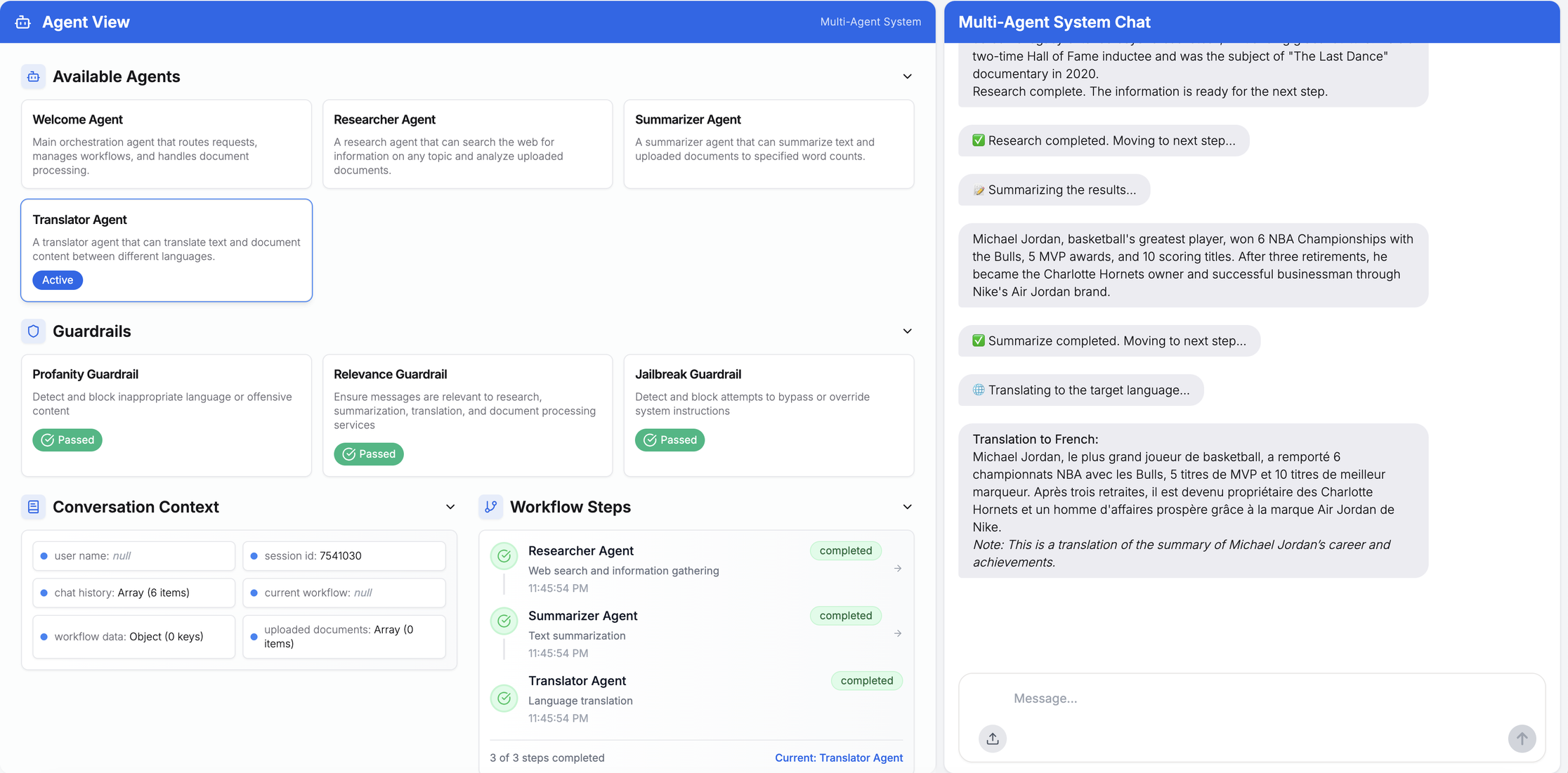 Figure 4: Summarizer -> Summary -> Handoff to Translator -> Summary results in French
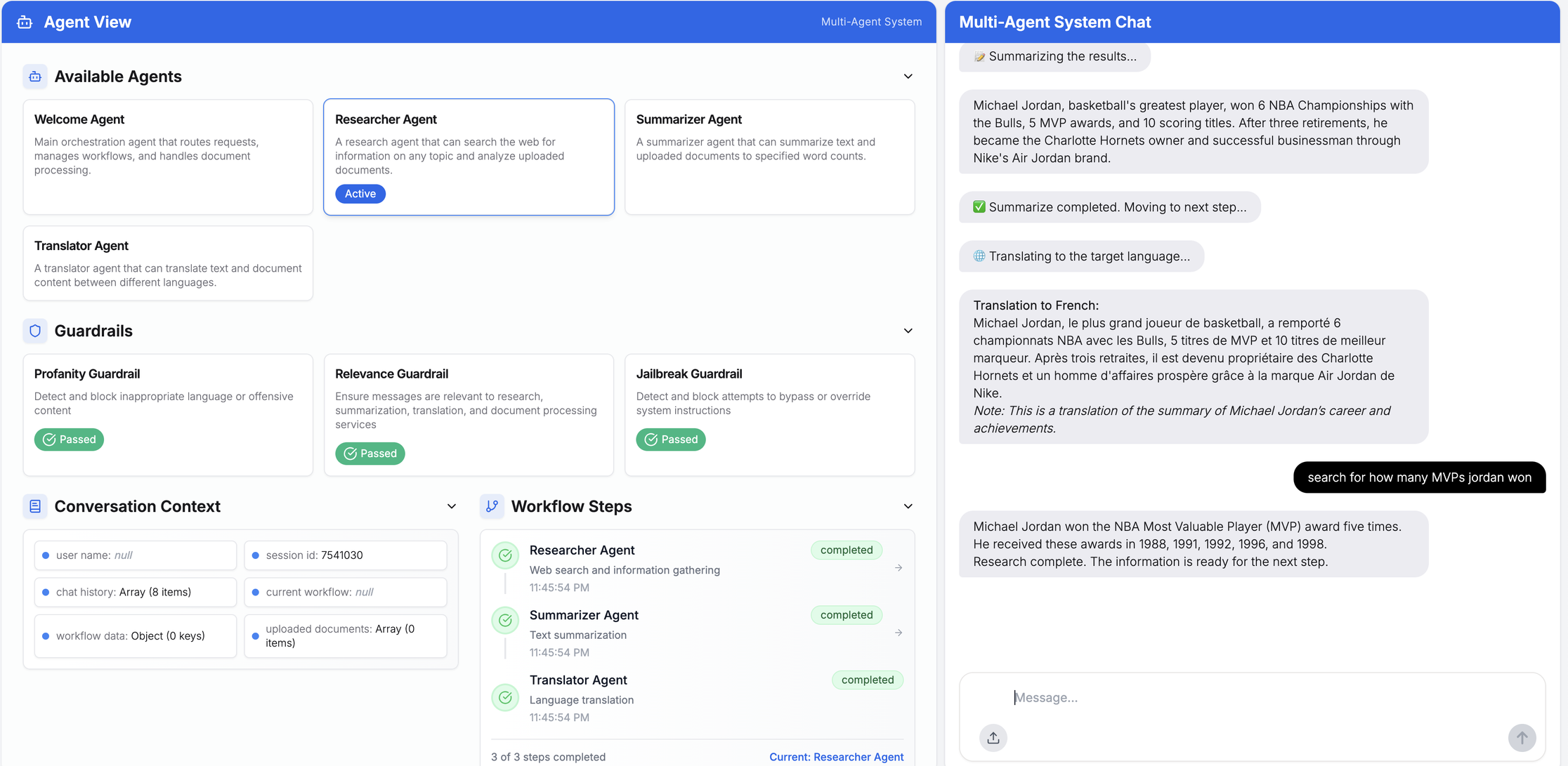 Figure 5: User chat continues with Context and History -> Translator handoff -> Researcher -> Response
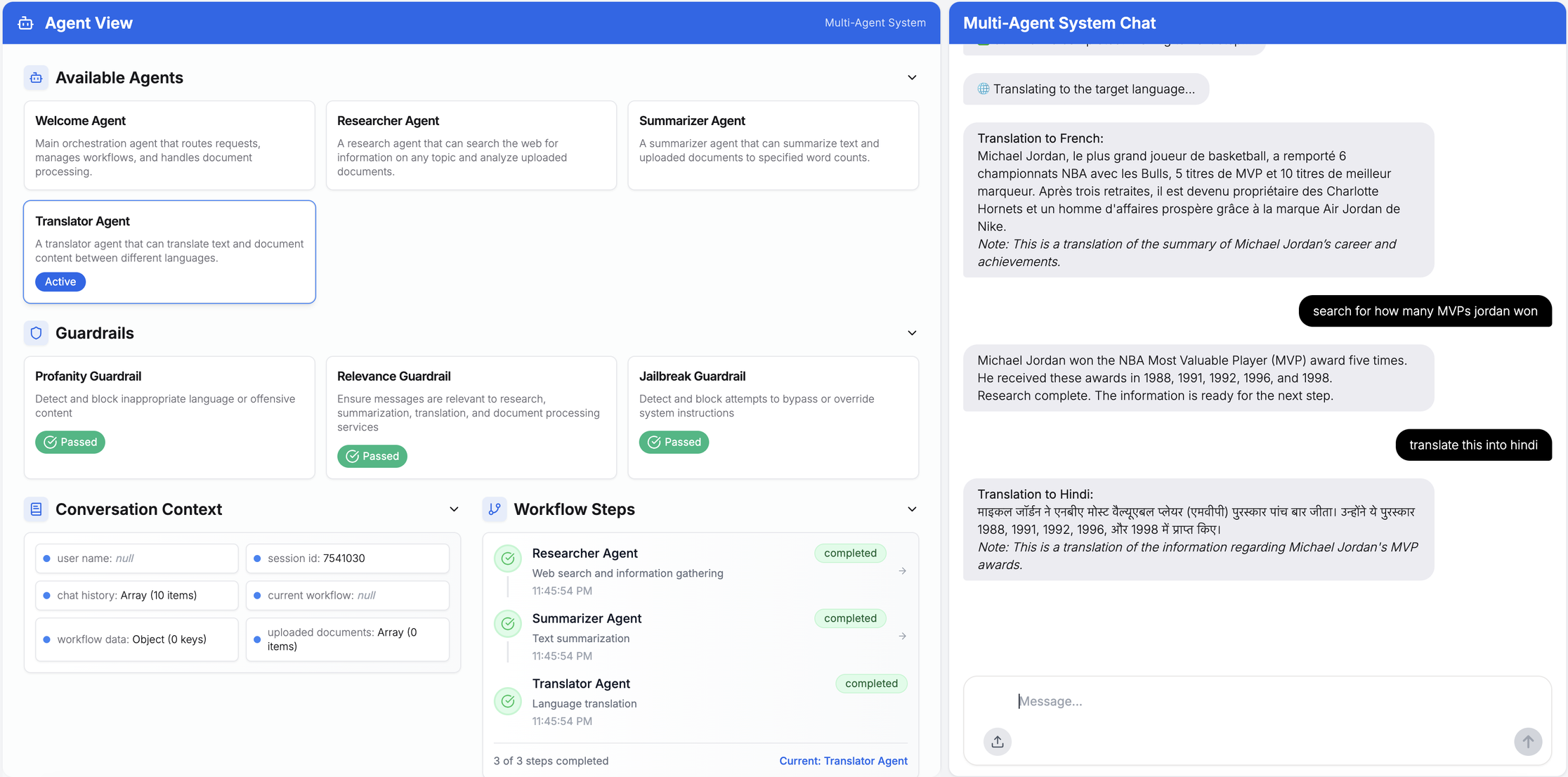 Figure 6: Researcher -> Handoff -> Translator to translate results to Hindi, keeping context and history
Multi-agent processing for CSV files uploaded
This example includes sample customer data to showcase multi-agent workflows process with context and history in the chat session.
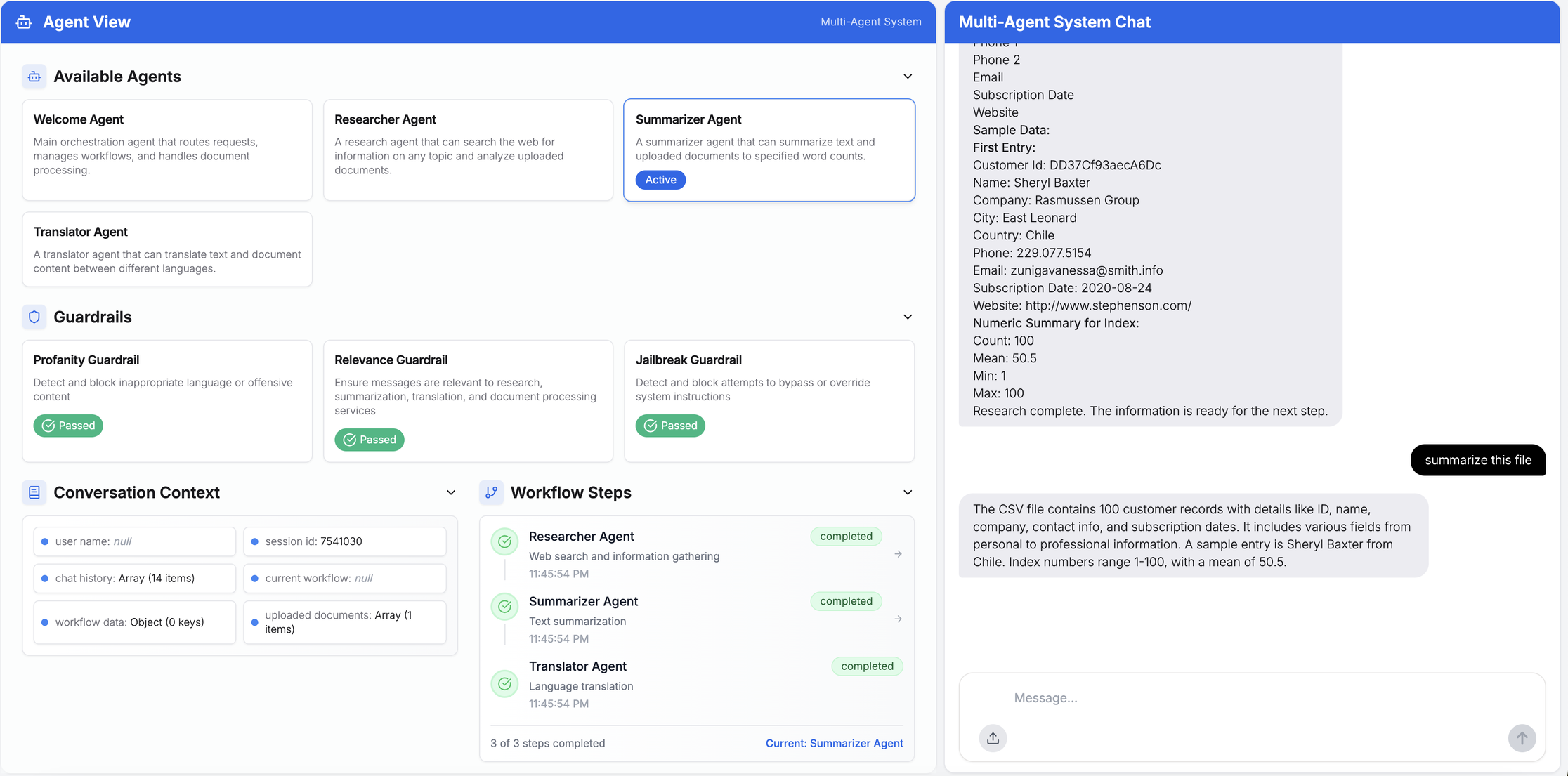 Figure 7: Customer Data CSV -> Summarize file -> Welcome Agent -> Handoff -> Summarizer
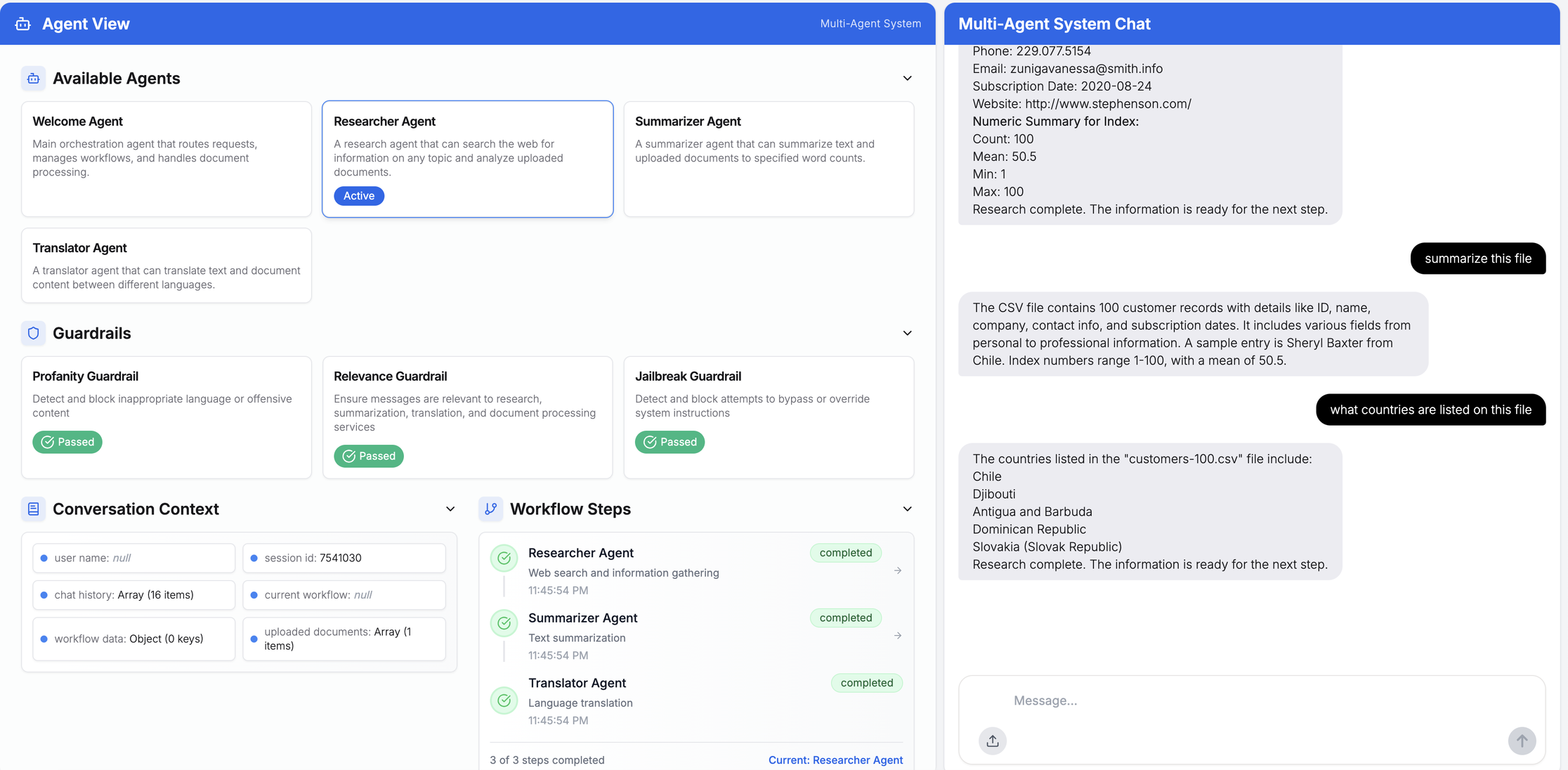 Figure 8: “What Countries are listed in the file” -> Summarizer Handoff -> Researcher -> results
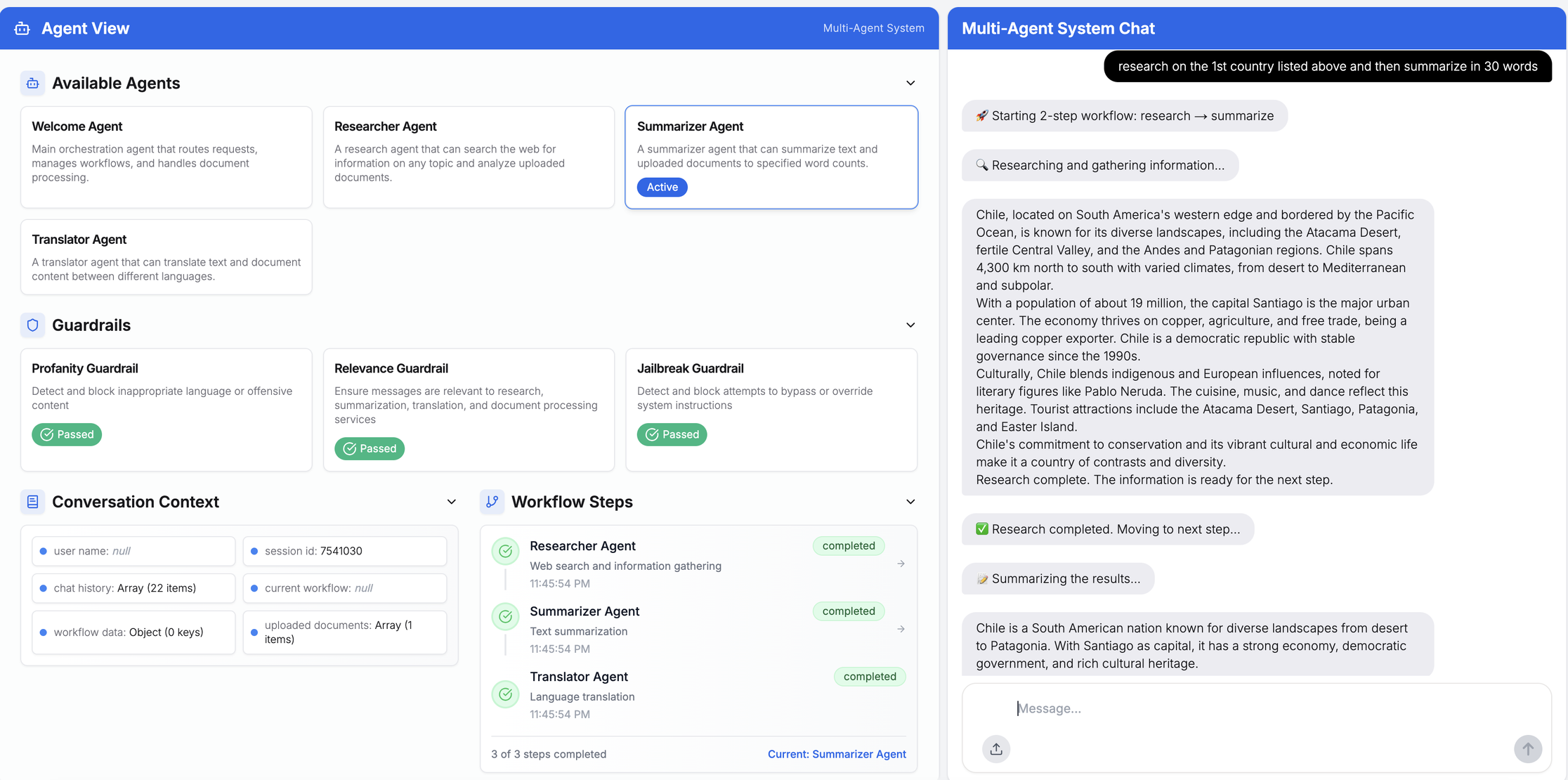 Figure 9: “Research on the 1st country in summary” -> uses context, history -> Researcher -> Results
Overall, the agent-to-agent handoffs worked well (and with context) during all the session runs. Tracing and debugging can be achieved by instrumenting the SDK with OpenTelemetry and sending the data to Dynatrace’s built-in AI Observability solution for Azure OpenAI. You can easily capture the multi-agent workflow for a given prompt on the Azure AI Foundry platform dashboard. You can find the code examples in our GitHub repository.
Set up tracing using Python
Using Python, you can set up the tracing by changing a few simple lines of code in your agent framework and core component:
from traceloop.sdk import Traceloop Traceloop.init( app_name="openai-cs-agents", api_endpoint="https://wkf10640.live.dynatrace.com/api/v2/otlp", disable_batch=True, headers=headers, should_enrich_metrics=True, ) with tracer.start_as_current_span(name="update_seat", kind=trace.SpanKind.INTERNAL) as span: context.context.confirmation_number = confirmation_number context.context.seat_number = new_seat assert context.context.flight_number is not None, "Flight number is required" return f"Updated seat to {new_seat} for confirmation number {confirmation_number}"You can see the results right away in distributed tracing:
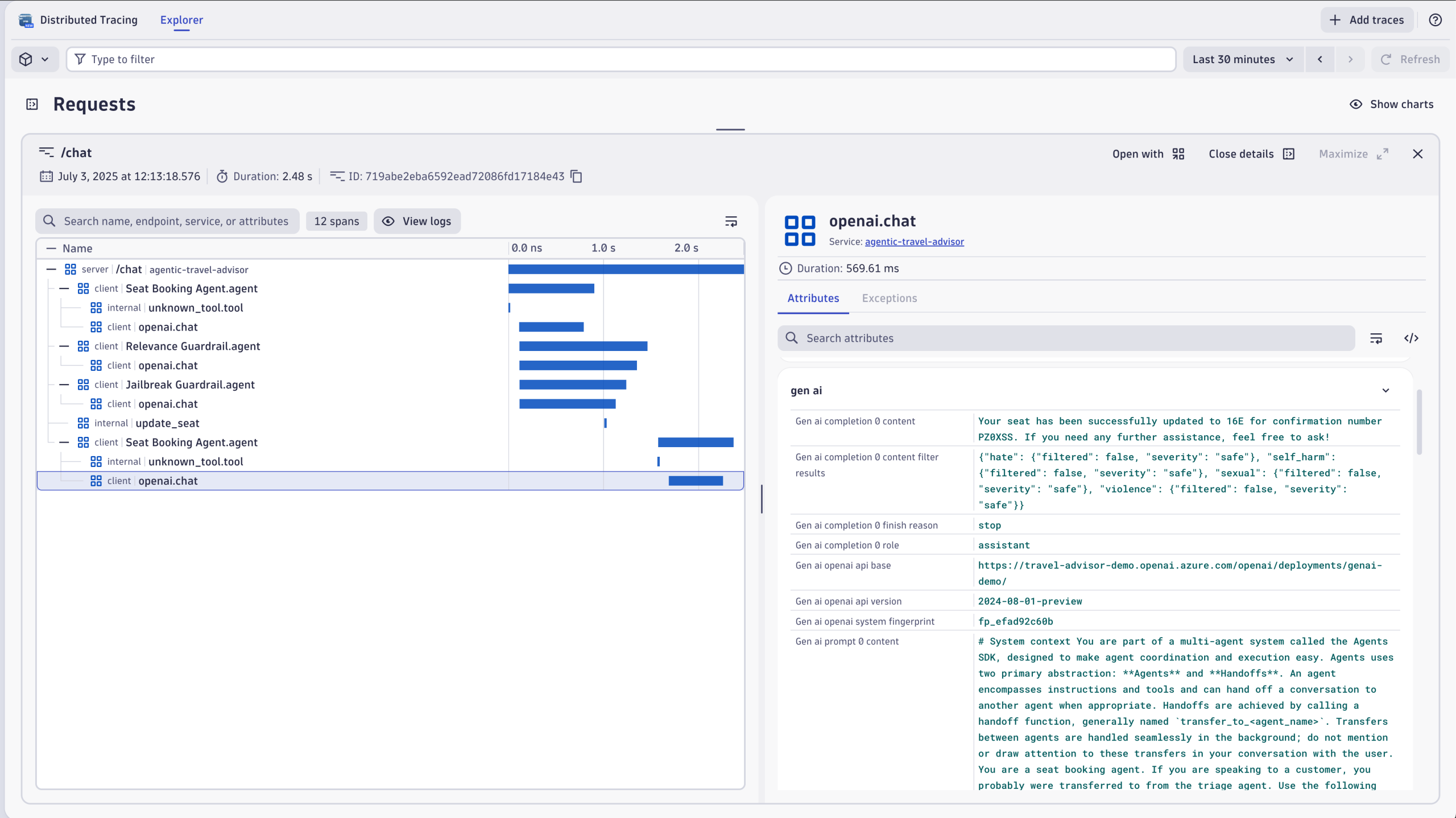 Figure 10: Multi-agent workflow trace view in Distributed Tracing
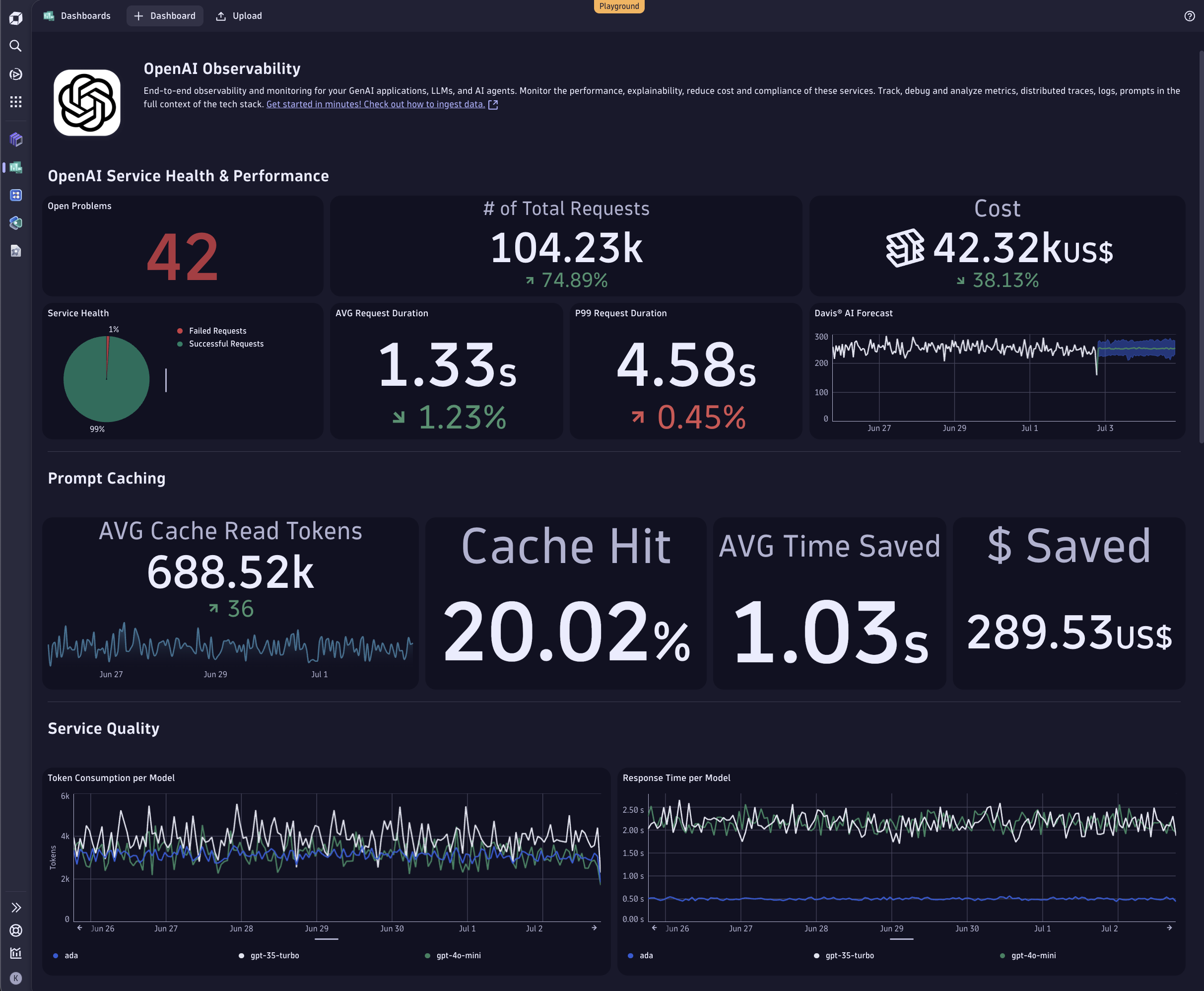 Figure 11: How to review all your OpenAI consumption on Dynatrace with AI Observability
OpenAI orchestration
Within the OpenAI framework, there are two approaches to orchestrating agents:
- Allow the LLM to make decisions: Use the intelligence of an LLM to plan, reason, and decide what steps to take.
- Orchestrate with code: Use code to determine the flow of agents.
Overall, the OpenAI Agents SDK is comprehensive and easy to get running with some minor code changes, this time with OpenAI’s Codex assistant.
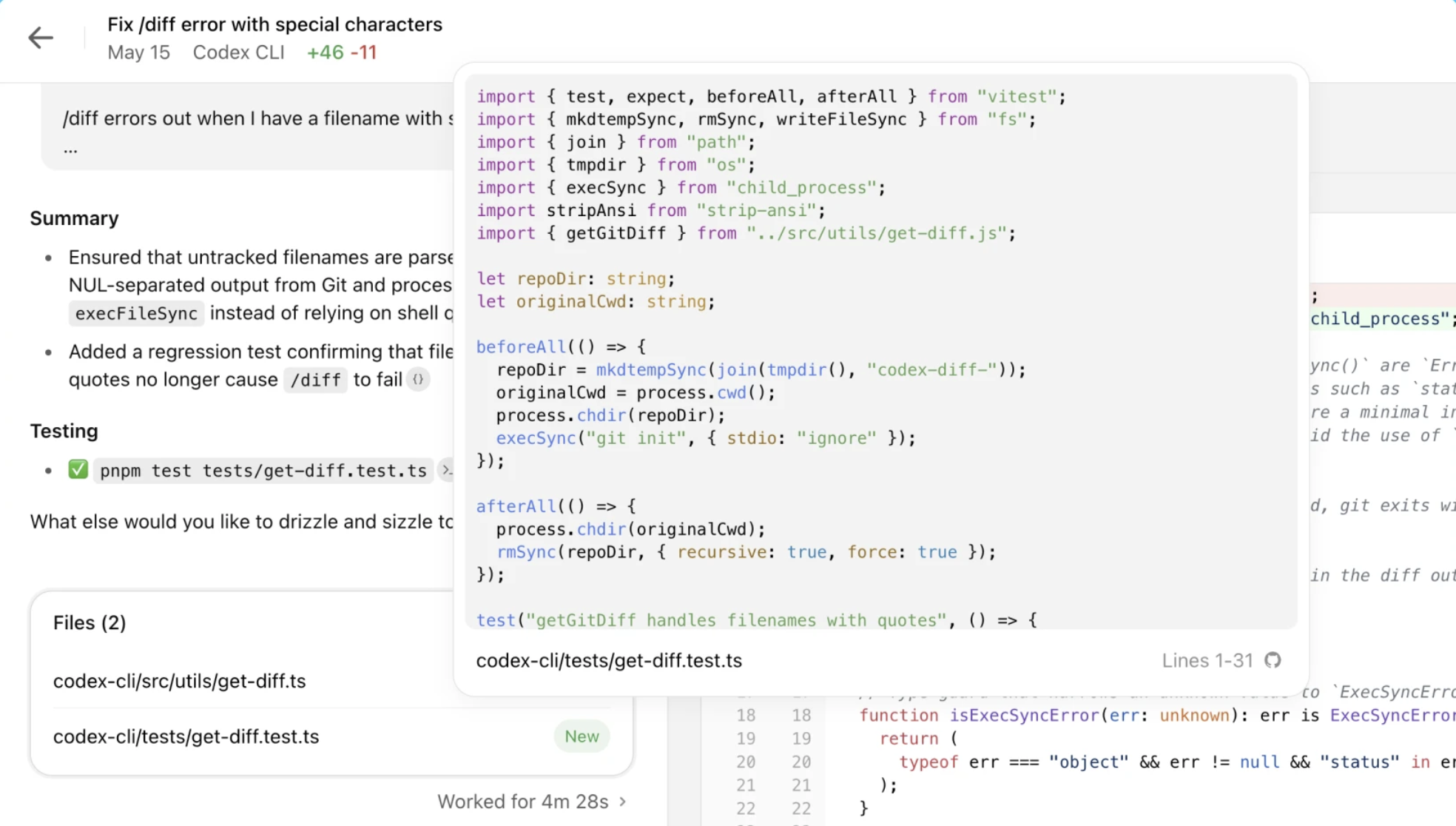 Figure 12: Codex example
Multiple frameworks and toolkits are quickly ramping up to make multi-agent systems a reality. We foresee this space evolving and innovating rapidly.
The evolution of multi-agent systems
As agentic AI continues to advance, multi-agent applications are poised to play a transformative role in reshaping how applications operate. These systems enable dynamic, context-aware collaboration between specialized agents, empowering businesses to tackle increasingly complex workflows. From helping with automation, orchestrating large-scale data analysis, multi-agent systems will unlock new levels of efficiency, scalability, and innovation.
Tools like the OpenAI Agents SDK on Azure AI Foundry are at the forefront of this evolution. By providing built-in capabilities such as agent handoffs, guardrails, and tracing, the SDK simplifies the development and monitoring of multi-agent workflows. These features make it easier for organizations to deploy robust AI systems and also ensure transparency and trustworthiness in their operations. These are key factors for widespread adoption.
Looking ahead, we can expect rapid innovation in this space. Emerging standards like A2A protocols and frameworks such as Google ADK are creating a vibrant ecosystem for multi-agent interoperability. The focus will likely shift toward even more intelligent and reliable orchestration, where agents autonomously plan, reason, and adapt to dynamic environments.
AI Observability for agentic AI applications
To keep pace with these advancements, we believe that observability must evolve in lockstep to ensure transparency across heterogeneous agent ecosystems. Advancements in observability tools, such as the Dynatrace AI Observability solution, are essential to help create more reliable and scalable AI frameworks at enterprise levels.
The future of multi-agent systems holds immense potential, with the OpenAI SDK marking the starting point. We’re just at the beginning of what’s possible. As this technology evolves, it will gradually become more stable and reliable, ultimately transforming the way we approach automation, collaboration, and AI-powered problem-solving across industries.
Check out our GitHub repo for detailed code examples for OpenAI Agents, AWS Strands, Google ADK, and to start building your own AI observability solutions today.
Read more
- Part one of the Rise of Agentic AI blog series covers the fundamentals of AI agents, models, and emerging communication standards such as Agent2Agent (A2A) and MCP.
- Part two explores how monitoring A2A and MCP communications results in better, more effective agentic AI. This blog post covers AI agent observability and monitoring, and how to scale and monitor Amazon Bedrock Agents.
- Part three explains how to monitor Amazon Bedrock Agents and how observability optimizes AI agents at scale.
- Part 4 covers full-stack observability for AI with NVIDIA Blackwell and NVIDIA NIM.
Together, these capabilities make it possible to achieve robust, scalable observability in agentic AI environments so teams can build reliable and trustworthy applications and services.