 7 months ago
158
7 months ago
158
Creating dbt models manually is a tedious process that can consume hours of a data engineer's time. Especially when no (big) business transformations are made, it is not the most attractive part of an engineer's work with data.
But what if you could automate this entire process? In this walkthrough, I'll show you exactly how GitLab Duo Agent Platform can generate comprehensive dbt models in just minutes, complete with proper structure, tests, and documentation.
What we're building
Our marketing team wants to effectively manage and optimize advertising investments. One of the advertising platforms is Reddit, so, therefore, we are extracting data from the Reddit Ads API to our enterprise Data Platform Snowflake. At GitLab, we have three layers of storage:
- raw layer - first landing point for unprocessed data from external sources; not ready for business use
- prep layer - first transformation layer with source models; still not ready for general business use
- prod layer - final transformed data ready for business use and Tableau reporting

For this walkthrough, data has already landed in the raw layer by our extraction solution Fivetran, and we'll generate dbt models that handle the data through the prep layer to the prod layer.
Without having to write a single line of dbt code ourselves, by the end of the walkthrough we will have:
- Source models in the prep layer
- Workspace models in the prod layer
- Complete dbt configurations for all 13 tables (which includes 112 columns) in the Reddit Ads dataset
- Test queries to validate the outcomes
The entire process will take less than 10 minutes, compared to the hours it would typically require manually. Here are the steps to follow:
1. Prepare the data structure
Before GitLab Duo can generate our models, it needs to understand the complete table structure. The key is running a query against Snowflake's information schema, because we are currently investigating how to connect GitLab Duo via Model Context Protocol (MCP) to our Snowflake instance:
SELECT table_name, column_name, data_type, is_nullable, CASE WHEN is_nullable = 'NO' THEN 'PRIMARY_KEY' ELSE NULL END as key_type FROM raw.information_schema.columns WHERE table_schema = 'REDDIT_ADS' ORDER BY table_name, ordinal_position;This query captures:
- All table and column names
- Data types for proper model structure
- Nullable constraints
- Primary key identification (non-nullable columns in this dataset)
Pro tip: In the Reddit Ads dataset, all non-nullable columns serve as primary keys — a pattern. I validated by checking tables like ad_group, which has two non-nullable columns (account_id and id) that are both marked as primary keys. Running this query returned 112 rows of metadata that I exported as a CSV file for model generation. While this manual step works well today, we're investigating a direct GitLab Duo integration with our Data Platform via MCP to automate this process entirely.
2. Set up GitLab Duo
There are two ways to interact with GitLab Duo:
- Web UI chat function
- Visual Studio Code plugin
I chose the VS Code plugin because I can run the dbt models locally to test them.
3. Enter the 'magic' prompt
Here's the exact prompt I used to generate all the dbt code:
Create dbt models for all the tables in the file structure.csv. I want to have the source models created, with a filter that dedupes the data based on the primary key. Create these in a new folder reddit_ads. I want to have workspace models created and store these in the workspace_marketing schema. Take this MR as example: [I've referenced to previous source implementation]. Here is the same done for Source A, but now it needs to be done for Reddit Ads. Please check the dbt style guide when creating the code: https://handbook.gitlab.com/handbook/enterprise-data/platform/dbt-guide/Key elements that made this prompt effective:
- Clear specifications for both source and workspace models.
- Reference example from a previous similar merge request.
- Style guide reference to ensure code quality and consistency.
- Specific schema targeting for proper organization.
4. GitLab Duo's process
After submitting the prompt, GitLab Duo got to work. The entire generation process took a few minutes, during which GitLab Duo:
- Read and analyzed the CSV input file.
- Examined table structures from the metadata.
- Referenced our dbt style guide for coding standards.
- Took similar merge request into account to properly structure.
- Generated source models for all 13 tables.
- Created workspace models for all 13 tables.
- Generated supporting dbt files:
- sources.yml configuration.
- schema.yml files with tests and documentation.
- Updated dbt_project.yml with schema references.
The results
The output was remarkable:
- 1 modified file: dbt_project.yml (added reddit_ads schema configuration)
- 29 new files:
- 26 dbt models (13 source + 13 workspace)
- 3 YAML files
- Nearly 900 lines of code generated automatically
- Built-in data tests, including unique constraints on primary key columns
- Generic descriptions for all models and columns
- Proper deduplication logic in source models
- Clean, consistent code structure following the GitLab dbt style guide
Sample generated code
Here's an example of the generated code quality. For the time_zone table, GitLab Duo created:
Prep Layer Source Model
WITH source AS ( SELECT * FROM {{ source('reddit_ads','time_zone') }} QUALIFY ROW_NUMBER() OVER (PARTITION BY id ORDER BY _fivetran_synced DESC) = 1 ), renamed AS ( SELECT id::VARCHAR AS time_zone_id, code::VARCHAR AS time_zone_code, dst_offset::NUMBER AS time_zone_dst_offset, is_dst_active::BOOLEAN AS is_time_zone_dst_active, name::VARCHAR AS time_zone_name, offset::NUMBER AS time_zone_offset, _fivetran_synced::TIMESTAMP AS fivetran_synced_at FROM source ) SELECT * FROM renamedSchema.yml
models: - name: reddit_ads_time_zone_source description: Time zone data from Reddit Ads system columns: - name: time_zone_id description: Unique identifier for time zone records data_tests: - unique - not_null - name: time_zone_code description: Code for the time zone - name: time_zone_dst_offset description: Daylight saving time offset for the time zone - name: is_time_zone_dst_active description: Flag indicating if daylight saving time is active - name: time_zone_name description: Name of the time zone - name: time_zone_offset description: Offset for the time zone - name: fivetran_synced_at description: Timestamp when the record was last synced by FivetranSource.yml
sources: - name: reddit_ads database: RAW schema: reddit_ads loaded_at_field: _fivetran_synced loader: fivetran description: Reddit Ads data quoting: database: true schema: false identifier: false tables: - name: time_zoneWorkspace Model
WITH source AS ( SELECT * FROM {{ ref('reddit_ads_time_zone_source') }} ) SELECT * FROM source5. Quality validation
Now that the code looks good, I pushed it to the MR and executed CI test pipeline to test the code and validate the outcome. I asked GitLab Duo to create a validation query:
Create a test query to test the row counts between the raw layer and the workspace layer. Keep in mind that we do deduplication, so we can compare both using distinct on the primary keys.The AI generated a comprehensive validation query that:
- Compared row counts between raw and workspace layers.
- Accounted for deduplication logic.
- Tested all 13 tables.
- Calculated data retention percentages.
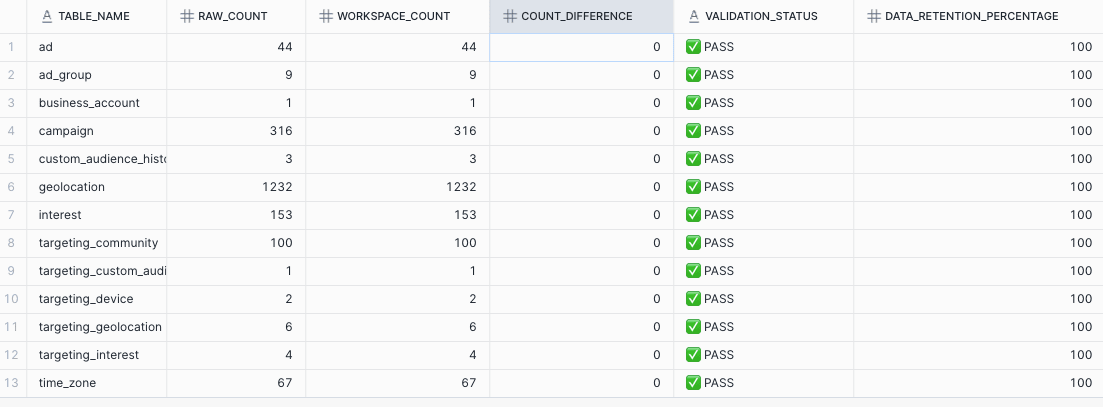
Running this query showed:
- Zero differences in row counts after deduplication
- 100% data retention across all tables
- All tests passed successfully
The bottom line: Massive time savings
-
Traditional approach: 6-8 hours of manual coding, testing, and debugging
-
GitLab Duo approach: 6-8 minutes of generation + review time
This represents a 60x improvement in developer efficiency (from 6-8 hours to 6-8 minutes), while maintaining high code quality.
Best practices for success
Based on this experience, here are key recommendations:
Prepare your metadata
- Extract complete table structures including data types and constraints.
- Identify primary keys and relationships upfront.
- Export clean, well-formatted CSV input files.
Note: By connecting GitLab Duo via MCP to your (meta)data, you could exclude this manual step.
Provide clear context
- Reference existing example MRs when possible.
- Specify your coding standards and style guides.
- Be explicit about folder structure and naming conventions.
Validate thoroughly
- Always create validation queries for data integrity.
- Test locally before merging.
- Run your CI/CD pipeline to catch any issues.
Leverage AI for follow-up tasks
- Generate test queries automatically.
- Create documentation templates.
- Build validation scripts.
What's next
This demonstration shows how AI-powered development tools like GitLab Duo are also transforming data engineering workflows. The ability to generate hundreds of lines of production-ready code in minutes — complete with tests, documentation, and proper structure — represents a fundamental shift in how we approach repetitive development tasks.
By leveraging AI to handle the repetitive aspects of dbt model creation, data engineers can focus on higher-value activities like data modeling strategy, performance optimization, and business logic implementation.
Ready to try this yourself? Start with a small dataset, prepare your metadata carefully, and watch as GitLab Duo transforms hours of work into minutes of automated generation.
Trial GitLab Duo Agent Platform today.